SignedText Helper Extension
Make content authenticity verification easier directly in your browser. The SignedText Helper extension lets you verify signed blocks on websites with a single click.
How to use it?
The SignedText Helper extension works in Chrome, Edge, Firefox, and Firefox for Android. After installation, it is important to pin the extension to your address bar.
You start the verification by clicking on the extension icon. A window will open with a menu where you select Verify content (or Ověřit obsah in Czech). Subsequently, three dots (...) will appear next to the icon, indicating that the extension is working.
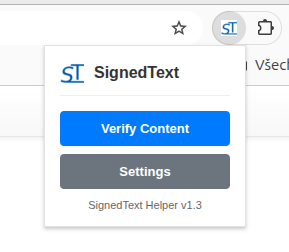
Instant feedback
You can tell the verification progress by the three dots next to the extension icon. Once completed, you will see the result directly near the text on the page.

Key benefits
- Fast verification: The status will be displayed immediately after clicking the verification button (Verify content) in the extension window.
- Convenient signing: No manual HTML copying — the extension does it for you.
- Detailed information: By clicking the verification result, you can view details about the author and signature version.
- Credibility: You can be sure you’re reading exactly what the author signed.
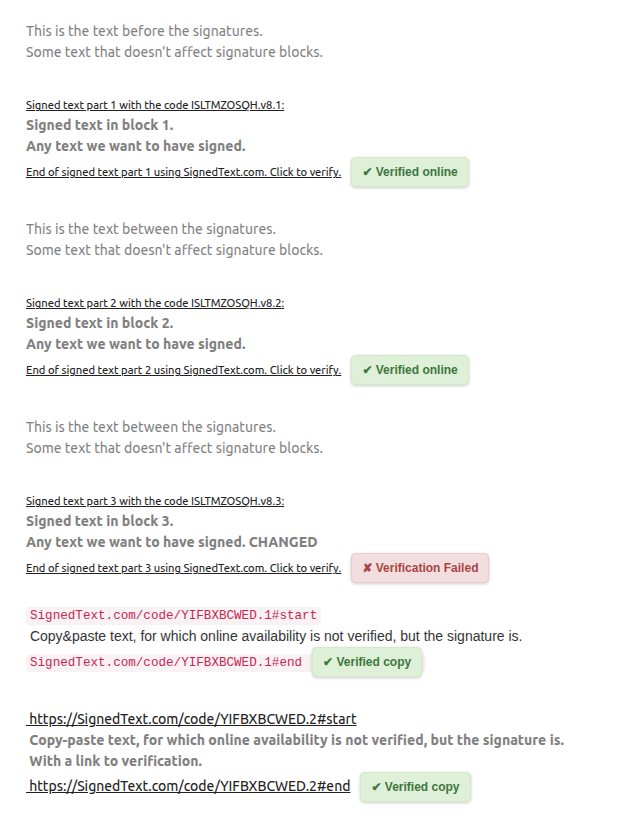
Details in one click
If you're curious about signature details, simply hover over or click the verification icon. The extension will show who signed the text and when.

Automatic source code insertion
When creating a new signature or verifying manually on our website, the extension saves you from manual copying. It automatically inserts the current source code of the page being signed directly into the form.